
Goodbye UMID: How to Apply for the New MySSS Card (2026 Comprehensive Guide)

by Nicole S. Aquino
0 comments 19 minutes read
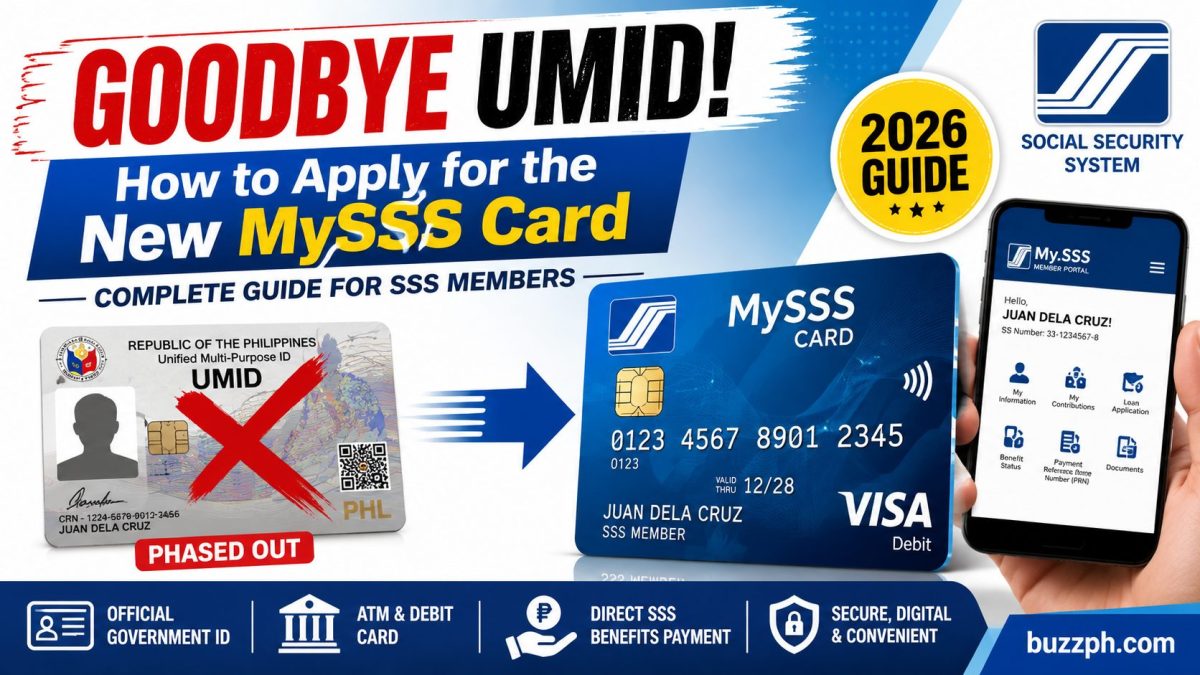
MySSS Card Application 2026 guide showing the transition from UMID to the new SSS-issued card.
🇵🇭 2026 SSS Member Guide

MySSS Card Application 2026: The Complete Step-by-Step Guide

Getting your MySSS Card in 2026 doesn't mean a half-day trip to a crowded SSS branch anymore. The whole process now runs through your phone or laptop, using facial verification, your National ID, and a partner bank app — and if you don't know the order of operations ahead of time, it's easy to get stuck on a single error screen.

This guide walks through the full MySSS Card Application 2026 process: who qualifies, what the card actually does once it arrives, what it costs (usually nothing), and what to do when the system rejects your photo or flags a data mismatch.

It's written for three kinds of readers: members who still carry an old plastic UMID card and aren't sure if they need to upgrade, first-time SSS members who've never had a physical ID from the agency, and anyone whose application stalled halfway through the bank's e-KYC step.

By the end, you'll know which documents to have on hand, how long the card realistically takes to arrive, and which SSS branches are actually worth a visit if your account needs a manual fix.

💡 What This Actually Costs: For most members, the MySSS Card itself is free — SSS covers printing for first-time applicants and for online UMID-to-card upgrades. The only real expense most people will ever pay is a ₱200 to ₱250 replacement fee if the card is lost, damaged, or stolen.
1
Why the MySSS Card Replaced the Old UMID System

For over a decade, the Unified Multi-Purpose ID was the standard government ID for SSS members. That's changed. As part of the country's broader move toward digital governance through the PhilSys national ID system, SSS has stopped producing standalone UMID cards at the branch level. Walk into a branch today asking for a fresh UMID biometric capture, and you'll be told to apply online instead.

Its replacement is the MySSS Card, built in partnership with commercial and rural banks like RCBC (through DiskarTech), UnionBank, and EastWest Rural Bank. Where the old UMID was just a photo ID with a chip, the MySSS Card does double duty: it's your official SSS-recognized ID and an EMV-chip Visa or Mastercard debit card at the same time.

Once you activate it, the card becomes your default disbursement account inside the SSS system. Salary loans, maternity benefits, sickness allowances, and pensions all land directly in the linked bank account. You no longer have to log in separately to the old Disbursement Account Enrollment Module just to register where your money goes.

Say you're a member who filed a maternity claim back in 2023 through the manual DAEM process — that enrollment still works, but it's no longer the path SSS is steering people toward. If you apply for the MySSS Card later, the new account it creates will override whatever bank details you had on file before, so it's worth knowing that going in rather than being surprised when your next benefit lands somewhere new.

✓ Top Highlights — What Changed
  • Dual Function — works as a government ID and a bank debit card in one
  • Bank Partners — RCBC (DiskarTech), UnionBank, and EastWest Rural Bank
  • Auto-Disbursement — loans and benefits credit straight to the linked account
  • No More Manual DAEM — disbursement enrollment happens automatically
  • EMV Chip Debit Card — usable anywhere Visa or Mastercard is accepted
  • Old UMID Still Valid — your existing card keeps working as an ID
🏢 Partner Banks: RCBC, UnionBank, EastWest 💳 Card Type: EMV Chip Visa/Mastercard
📝 Status Needed: Permanent SSS membership ⏳ Production: 15–20 working days
📅 Status: Fully replacing standalone UMID issuance nationwide
💡
Heads Up: Before you do anything else, confirm your SSS membership status is "Permanent" and not "Temporary." This single detail decides whether you can apply fully online or whether you'll need a branch visit first, so it's worth checking before you start filling out anything.
2
Who Can Apply: Mandatory Prerequisites

Because the 2026 process is fully digital, SSS no longer captures biometrics manually at branches for this card. Instead, the system checks your member profile against the Philippine National ID registry. That means the prerequisites aren't really about paperwork you bring with you — they're about whether your existing records already line up.

First, your SSS number can't be tagged "Temporary." If you registered online years ago without ever presenting a physical PSA Birth Certificate at a branch, your account is likely still temporary, and the card application simply won't be available to you until that's fixed in person. Second, you need active credentials on the My.SSS web portal, since the entire application happens there.

Third, you'll need a PhilSys National ID — and it doesn't have to be the physical card. A digital ePhilID is accepted too, which matters if your printed PhilID is still stuck in the delivery backlog many applicants experienced in prior years. Fourth, and this trips up more people than anything else: your full legal name, middle name, suffix, and birth date have to match letter-for-letter between your SSS profile and your National ID.

A common scenario looks like this: a member's SSS record lists "Dela Cruz" as one word while the National ID has it as two words, "De La Cruz." That tiny difference is enough to fail the automated check. It's not a sign anything is wrong with your identity — it's just a database mismatch, and it's fixable, which we'll cover in the troubleshooting section further down.
✓ Top Highlights — Eligibility Checklist
  • Permanent Status — SSS number not flagged as Temporary
  • My.SSS Portal Access — active login credentials
  • PhilID or ePhilID — physical or digital, either works
  • Exact Name Match — same spelling across both records
  • Updated Mobile/Email — needed for OTPs during e-KYC
  • PSA Birth Certificate — required only if your status is Temporary
📋 Core Document: PhilID or ePhilID 🔐 Portal: My.SSS account active
🧾 Membership: Must be Permanent ✓ Name Match: Required letter-for-letter
⏱ If Temporary: Visit a branch with your PSA Birth Certificate first
💡
Pro Tip: Pull up your PhilID and your My.SSS profile side by side before you apply. Check the spelling of your middle name, any suffix like Jr. or III, and your exact birth date. Catching a mismatch now saves you a rejected application and a separate correction request later.
3
The Complete Application Workflow
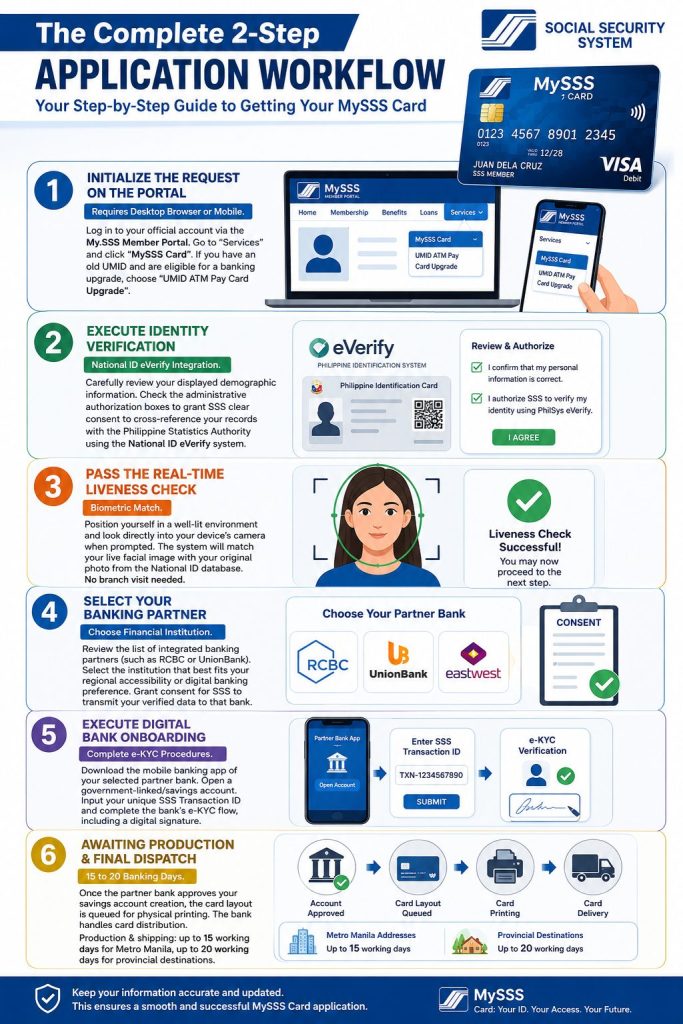
MySSS Card Application 2026 infographic showing the complete application workflow, identity verification, bank enrollment, and card delivery process.

The process splits into two phases: identity verification inside the SSS portal, then onboarding with your chosen bank. Start by logging into the My.SSS Member Portal, hovering over "Services," and clicking "MySSS Card." Legacy UMID holders who qualify for a direct upgrade will see a separate banner instead, labeled "UMID ATM Pay Card Upgrade" — click that one if it appears.

Next comes identity verification. The portal displays your demographic details and asks you to authorize SSS to cross-check them against the Philippine Statistics Authority using the National ID eVerify system. After that, you'll go through a real-time liveness check: sit in good lighting, look at your camera, and let the system match your live face against your original National ID photo. There's no branch photo capture involved at all.

Once verification clears, you'll pick a partner bank — RCBC, UnionBank, or EastWest, depending on what's offered in your case — and authorize SSS to send your verified details to that bank. From there, you download the bank's app (DiskarTech for RCBC, or UnionBank Online, for example), open a government-linked savings account, enter the SSS transaction ID you were given, and complete the bank's own e-KYC steps, including a digital signature.

Picture a member who finishes the SSS side on a Monday morning and downloads the bank app that same afternoon. If the e-KYC submission goes through cleanly, the bank approves the account, queues the card for printing, and handles shipping from there — SSS itself isn't involved in delivery at all, which matters later if your card is running late.

✓ Top Highlights — The 6 Stages
  • Step 1 — Initialize request via My.SSS Portal → Services → MySSS Card
  • Step 2 — Authorize National ID eVerify cross-check
  • Step 3 — Pass the real-time facial liveness check
  • Step 4 — Select your banking partner
  • Step 5 — Complete e-KYC in the bank's app
  • Step 6 — Wait for printing and bank-handled delivery
💻 Start Here: My.SSS Portal → Services 📸 Verification: Real-time facial liveness check
🏢 Bank Step: e-KYC inside the partner bank app 🚚 Delivery: 15 days Metro Manila / 20 days provincial
📦 Shipping Handler: Your partner bank, not SSS
💡
Pro Tip: Have your SSS transaction ID ready before opening the bank app — it's the link between your SSS verification and the new account, and the bank app will ask for it almost immediately. Write it down or screenshot it so you're not scrambling for it mid-application.
4
What It Actually Costs

Here's the part most members are relieved to hear: for the large majority of applicants, the MySSS Card costs nothing. SSS absorbs the administrative printing cost for first-time applicants, and the same applies to legacy UMID holders who complete the upgrade through the online automated invite rather than a third-party route.

The one scenario where you'll actually pay something is replacement — if your card is lost, damaged, or stolen, expect a fee in the ₱200 to ₱250 range, with the exact amount varying slightly depending on your partner bank's own card-issuance rules. That's still considerably less than what most commercial banks charge for a standalone debit card replacement.

On the banking side, partner banks waive the standard maintaining balance requirement for SSS-linked accounts, so you won't be penalized for keeping the balance at ₱0 between benefit credits. That's a meaningful difference from a typical savings account, where falling below the minimum balance usually triggers a monthly fee.

Think of a member who applies the moment they're eligible, never loses the card, and never needs a replacement — for that person, the entire journey from application to a working bank-linked ID costs exactly ₱0. The fee only shows up if something goes wrong physically with the card itself, not from the application process.
✓ Top Highlights — Fee Breakdown
  • First-Time Applicants — FREE, fully covered by SSS
  • UMID-to-Card Upgrade — FREE, via the online invite
  • Lost/Damaged/Stolen Card — ₱200 to ₱250
  • Maintaining Balance — Waived, ₱0 required
  • Fee Variance — Replacement cost depends slightly on bank
  • No Application Fee — at any stage of the official process
📩 First-Time Applicants: FREE 🔄 UMID Upgrade: FREE (online)
💳 Replacement Card: ₱200–₱250 🏢 Maintaining Balance: ₱0
📌 Official Channel Only: Apply directly through My.SSS, never a paid third party
💡
Money-Saving Tip: If your card goes missing, report it to your partner bank right away to block unauthorized transactions before you even request a replacement. Acting fast protects your linked account balance and keeps the ₱200–₱250 replacement fee as your only cost, instead of dealing with unauthorized withdrawals on top of it.

5
Fixing Common Application Errors
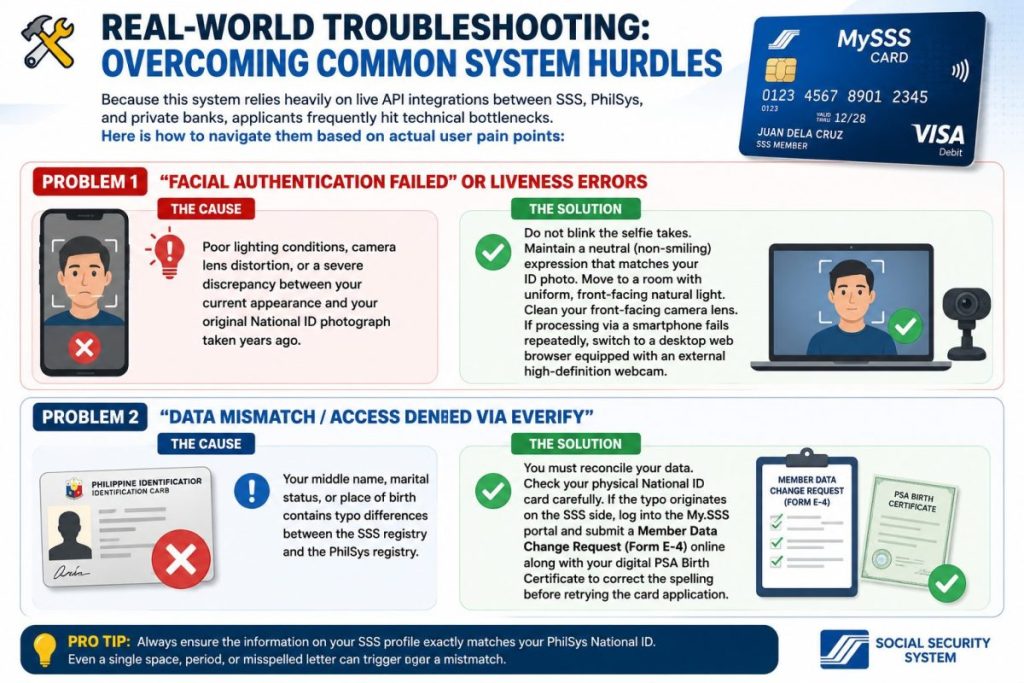
Step-by-step troubleshooting guide for MySSS Card Application 2026 showing solutions for facial authentication and data mismatch problems.

Since this system leans on live integrations between SSS, PhilSys, and private banks, hitting a snag somewhere in the chain isn't unusual. Most issues fall into one of two buckets: the facial liveness check fails, or the eVerify data match fails. Neither one means your application is permanently stuck — both have a clear fix.

Facial authentication failures usually come down to lighting and camera quality rather than anything wrong with your identity. Backlighting from a window behind you darkens your face and confuses the match. A dusty or smudged front camera lens does the same thing. If your phone keeps failing the check after a few tries, switch to a desktop browser with a decent external webcam — it often clears on the first attempt.

Data mismatch errors through eVerify happen when your middle name, marital status, or place of birth doesn't match exactly between the SSS registry and PhilSys. If the discrepancy traces back to the SSS side, you'll need to log into My.SSS and file a Member Data Change Request, known as Form E-4, along with a digital copy of your PSA Birth Certificate, before trying the card application again.

Take a member who's tried the liveness check four times in a dim bedroom with a window glaring behind them — switching to a well-lit kitchen table in the early afternoon and wiping the camera lens clears it on the next attempt almost every time. It sounds too simple to matter, but lighting genuinely is the most common fix.
✓ Top Highlights — Quick Fixes
  • Backlighting — face a light source, don't sit with your back to one
  • Camera Lens — wipe it clean before attempting verification
  • Desktop Fallback — try a webcam if mobile keeps failing
  • Name Typos — usually originate on the SSS side, not PhilSys
  • Form E-4 — the official correction request, filed online
  • PSA Birth Certificate — required attachment for most corrections
⚠ Error 1: Facial Authentication Failed 🔧 Fix: Better lighting + clean lens
⚠ Error 2: Data Mismatch (eVerify) 🔧 Fix: File Form E-4 with PSA Birth Certificate
⏱ Correction Timeline: Varies by branch — confirm directly with SSS after filing
💡
Pro Tip: Before assuming it's a system glitch, double-check that your phone's camera app actually has permission to access the camera inside your browser. A blocked permission can look identical to a failed liveness check, and it's a thirty-second fix once you spot it.
6
When You Must Visit a Branch
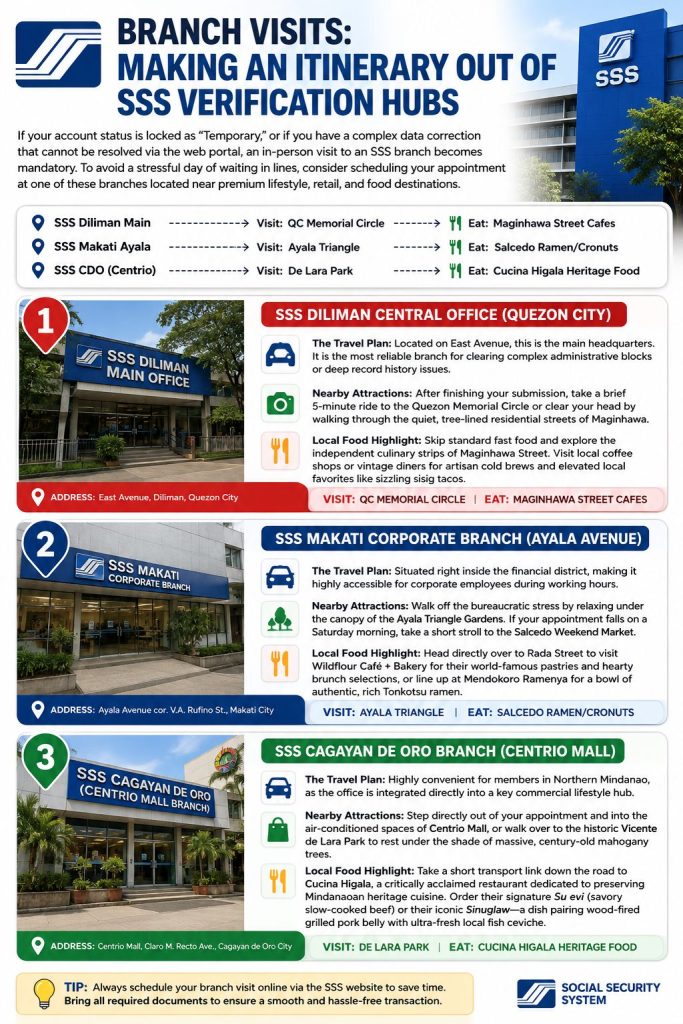
Guide to SSS branches for MySSS Card Application 2026 verification and account correction assistance.

Most applicants never need to set foot in an SSS office for this. But if your account is locked as Temporary, or if your data correction is too complex for the online Form E-4 process, a branch visit becomes necessary. Since you're already making the trip, it's worth picking a branch near somewhere worth going afterward instead of treating the whole day as wasted time.

The SSS Diliman Central Office on East Avenue in Quezon City is the headquarters branch, and it's generally the most reliable spot for clearing complicated record-history issues. Once you're done, the Quezon Memorial Circle is a short ride away, and the quiet residential streets of Maginhawa are nearby if you'd rather walk somewhere green.

If you're in Makati, the corporate branch sits right inside the Ayala Avenue financial district, which makes it easy to slot into a workday. The Ayala Triangle Gardens are right there for a quick walk afterward, and on a Saturday morning the Salcedo Weekend Market is worth the short stroll too.

Members in Northern Mindanao have it especially convenient — the SSS Cagayan de Oro branch sits inside Centrio Mall, so you can step straight from your appointment into air-conditioned shops, or head to the historic Vicente de Lara Park to sit under its old mahogany trees.

✓ Top Highlights — Branch Itinerary
  • SSS Diliman — main HQ, best for complex record fixes
  • SSS Makati Ayala — convenient for corporate employees
  • SSS Cagayan de Oro — inside Centrio Mall
  • Maginhawa Street — independent cafes near Diliman
  • Salcedo Weekend Market — Saturdays near Makati branch
  • Cucina Higala — heritage Mindanaoan cuisine near CDO branch
📍 Diliman: Quezon Memorial Circle nearby 📍 Makati: Ayala Triangle Gardens nearby
📍 CDO: Inside Centrio Mall 🎙 Bring: Valid ID + PSA Birth Certificate if correcting records
🕐 Best Time: Early morning, right at opening, to avoid long queues
💡
Pro Tip: Call the branch or check the My.SSS portal for appointment requirements before heading out. Some branches require a booked slot, and showing up without one can mean a wasted trip even if you brought every document correctly.
💰 Money and Time-Saving Tips for Your MySSS Card Application

A few small decisions can shave days off your application and keep your only real cost at ₱0. Here's what experienced applicants do differently.
1
Apply Online First, Skip the Branch Entirely If You Can

Unless your account is flagged Temporary, there's no reason to queue at a branch at all. The entire application lives on the My.SSS portal. Save the branch visit as a backup plan, not your first move.

2
Fix Name Mismatches Before You Submit, Not After

Filing Form E-4 after a failed application means starting over later. Compare your SSS profile against your PhilID first, and file any correction before you click apply. It's the single biggest cause of avoidable delays.

3
Pick a Bank You Already Use

If you already bank with UnionBank or already have RCBC's DiskarTech installed, choose that partner. You'll skip the learning curve of a brand-new app during e-KYC, which is usually where first-timers lose the most time.

4
Never Pay a "Facilitator" for a Free Process

First-time applications and online UMID upgrades cost ₱0 through official channels. If anyone offers to "process" your card for a fee outside SSS or the bank app, that's not a legitimate shortcut — it's an unnecessary expense for something already free.

5
Take Your Liveness Photo in Natural Daylight

Avoid sitting with a window behind you. A spot facing a window, or simply outdoors in the shade, gives the camera even lighting and a much higher chance of passing the facial check on the first try.

6
Report a Lost Card to Your Bank, Not Just SSS

Your bank can freeze the card immediately, while SSS itself doesn't manage the physical card or transactions on it. Acting fast protects your account and keeps your only cost at the standard ₱200–₱250 replacement fee.

❓ Frequently Asked Questions
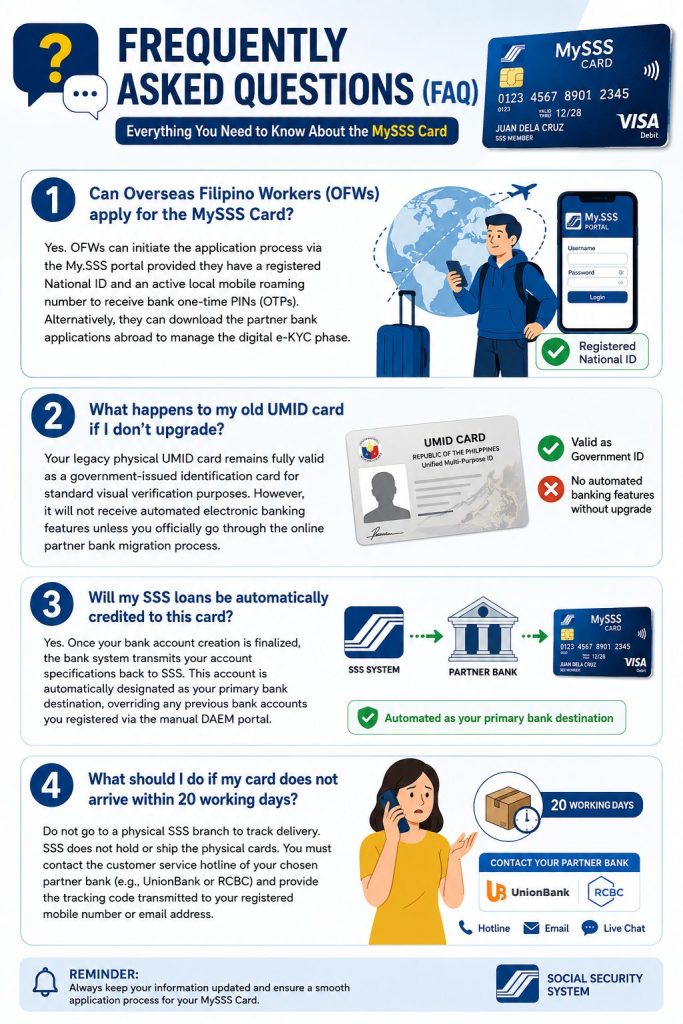
Visual FAQ guide for MySSS Card Application 2026 explaining application eligibility, card upgrades, benefit crediting, and delivery concerns.
Can OFWs apply for the MySSS Card?
Yes, OFWs who are active SSS voluntary members can apply. The process is fully online, so you don't need to be physically in the Philippines to complete it. You'll need a PhilID or ePhilID and active My.SSS portal credentials. The card will be delivered to your registered Philippine address, so make sure that address is current in your profile before you submit.
What happens if I never upgrade my old UMID?
Your old UMID card remains a valid government-issued ID indefinitely — SSS has not set an expiry date on existing cards. What you lose is access to the automatic disbursement feature. Benefits and loans will continue crediting to whatever bank account you have on file under the old DAEM enrollment, or require manual processing. You won't be penalized for not upgrading, but you also won't get the debit card convenience the new system offers.
Will my SSS loans automatically credit to this card?
Yes — once the MySSS Card account is fully activated, it becomes your primary disbursement account. Salary loans, calamity loans, maternity benefits, sickness allowances, and retirement pensions all credit to the linked savings account automatically. You don't need to re-enroll through DAEM or set up a separate account. Any pending benefit claims in the queue at the time of activation will redirect to the new account as well.
My card hasn't arrived after 20 working days — now what?
Contact your partner bank directly first — not SSS. The bank handles printing and shipping, so they're the ones who can pull up the tracking status. For RCBC DiskarTech, use the in-app support chat. For UnionBank, call their customer service hotline or use their app. If the bank confirms the card was sent but never arrived, they'll initiate a resend. SSS involvement is only needed if the bank confirms the card was never printed due to a system error on the SSS side.
Does the MySSS Card expire?
Yes, the card has a standard debit card expiry date printed on it, typically three to five years from issuance depending on the partner bank. When it expires, the bank will send a replacement card automatically to your registered address — similar to how any bank debit card renewal works. Your SSS benefits and ID validity are not affected by the card's expiry; the underlying savings account and government ID status remain active regardless.
Can I choose which bank I want?
You can choose from the available partner banks presented to you during the application — typically RCBC (through DiskarTech), UnionBank, and EastWest Rural Bank. The options shown may vary based on your member profile and current SSS system availability. You cannot change your partner bank after the application is completed, so consider which bank's app you're more comfortable using before you confirm your selection.
What documents do I need for a branch visit?
For a Temporary-to-Permanent status upgrade, bring your original PSA Birth Certificate plus one photocopy, your PhilID or another primary government ID, and your SSS number. For a data correction under Form E-4, bring the same documents plus a printed or digital copy of the completed E-4 form. Some branches now require a pre-booked appointment, so call ahead or check the My.SSS portal for your nearest branch's current walk-in policy before you travel.
Your MySSS Card Application 2026 Starts With One Login

Check your SSS membership status first, confirm your name matches your PhilID letter-for-letter, and you'll have everything you need to complete the MySSS Card application in a single session. For most members, it costs nothing and takes less than an hour — and the card that arrives gives you a working government ID and a bank account in one.