
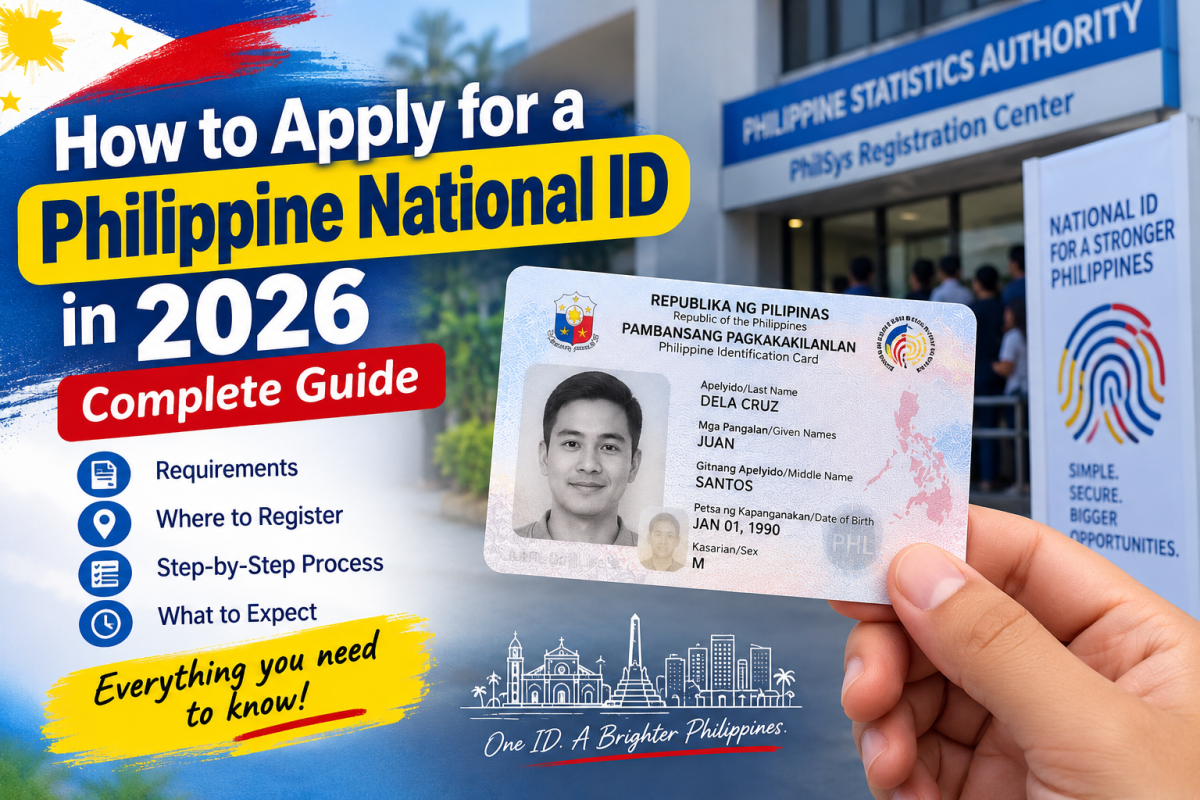
Philippine National ID application is available to eligible Filipinos through the Philippine Identification System (PhilSys), with registration conducted at designated centers and through selected mobile registration activities. Before visiting a registration site, applicants should know which supporting documents are accepted, what information and biometric details will be collected, and what to do after completing registration. This 2026 guide explains the process in practical terms, including registration requirements, the Digital National ID, tracking, corrections, and common issues applicants should know before they register.
If you still do not have a Philippine National ID, the registration process is easier to understand when you know what to bring, where to go, and what will happen once you arrive. The Philippine Identification System (PhilSys), managed by the Philippine Statistics Authority (PSA), continues to accept registrations in 2026 through designated registration centers and mobile registration activities.
The National ID is intended to provide Filipinos and qualified resident aliens with a reliable proof of identity. It can be used for many government and private transactions, and registered individuals may also access the Digital National ID while waiting for or instead of relying solely on the physical card.
This guide was prepared using current PSA and PhilSys materials, including the official registration procedure, supporting-document requirements, National ID FAQs, and recent 2026 PSA announcements. Because registration locations and government services can change, applicants should verify the latest details through official PSA or PhilSys channels before traveling.
Who Can Register for a Philippine National ID?
PhilSys registration is open to Filipino citizens aged 1 and above. Qualified resident aliens can also register under the rules applicable to their status.
The process differs slightly for young children. For children from 1 to 4 years old, demographic information and a front-facing photograph are captured. Complete biometric information is collected when the child reaches age 5. A parent or legal guardian is involved in the registration process for children.
For adults and older children, registration involves validating personal information and capturing biometric information at a designated registration center.
If you have already registered successfully, you generally should not register again simply because you have not received your physical National ID. If information in your record needs to be corrected or updated, use the appropriate updating process instead.
What Do You Need to Register?
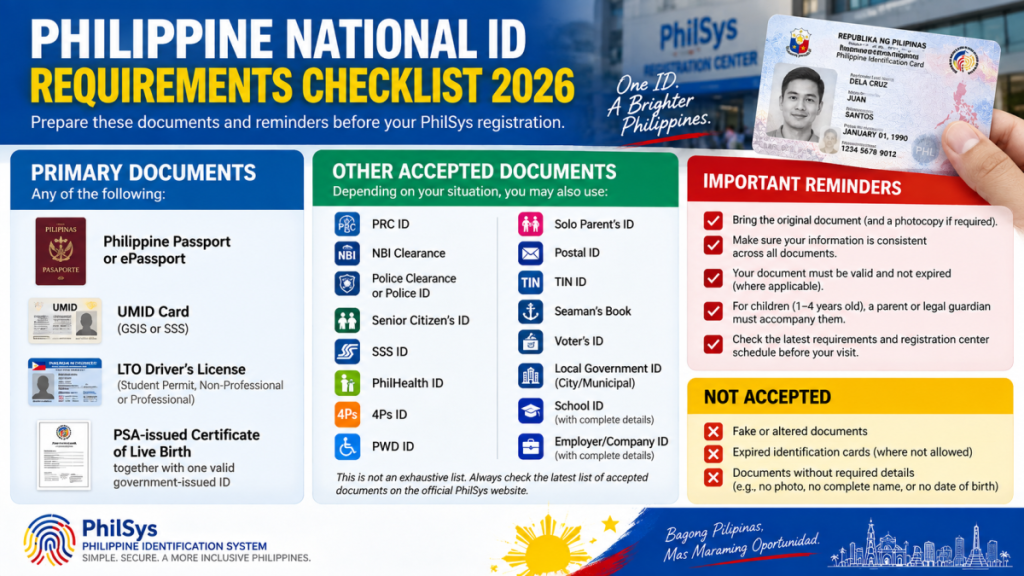
One of the easiest ways to avoid a wasted trip is to check your supporting document before leaving home.
The PSA accepts several primary and secondary documents for PhilSys registration. Depending on your situation, accepted documents may include:
- Philippine Passport or ePassport
- UMID card issued by GSIS or SSS
- Qualifying driver’s license or LTO-issued permit
- PSA-issued Certificate of Live Birth together with the required government-issued identification
- PRC ID
- NBI Clearance
- Police Clearance or qualifying police identification
- Senior Citizen’s ID
- SSS ID
- PhilHealth ID
- 4Ps ID
- PWD ID
- Solo Parent’s ID
- Postal ID
- TIN ID
- Other documents included in the official PhilSys supporting-document list
The exact requirements depend on the document you have and whether it satisfies the information requirements set by PhilSys. Some secondary documents must contain details such as your complete name, photograph, address, date of birth, and signature or thumbmark.
Do not rely on a National ID requirements list from an old Facebook post or an article published several years ago. The accepted-document list and registration arrangements have changed over time. Check the current official PhilSys list before your visit.
Where Can You Register?
National ID registration is available through designated PhilSys registration centers. Depending on your area, these may include PSA offices, mall-based registration sites, LGU locations, and other authorized facilities.
PSA also uses mobile registration to reach communities where access to permanent registration centers may be limited.
Registration access is continuing to expand in 2026. In September 2026, PSA announced a partnership with the Department of Health to establish National ID registration centers and kiosks in government hospitals nationwide. This is an example of how registration services continue to expand beyond traditional PSA locations.
Because registration schedules can vary, check the current location and operating hours before making a trip. A registration center mentioned in an older article may have moved, changed its schedule, or stopped accepting registrations.
How to Apply for a Philippine National ID
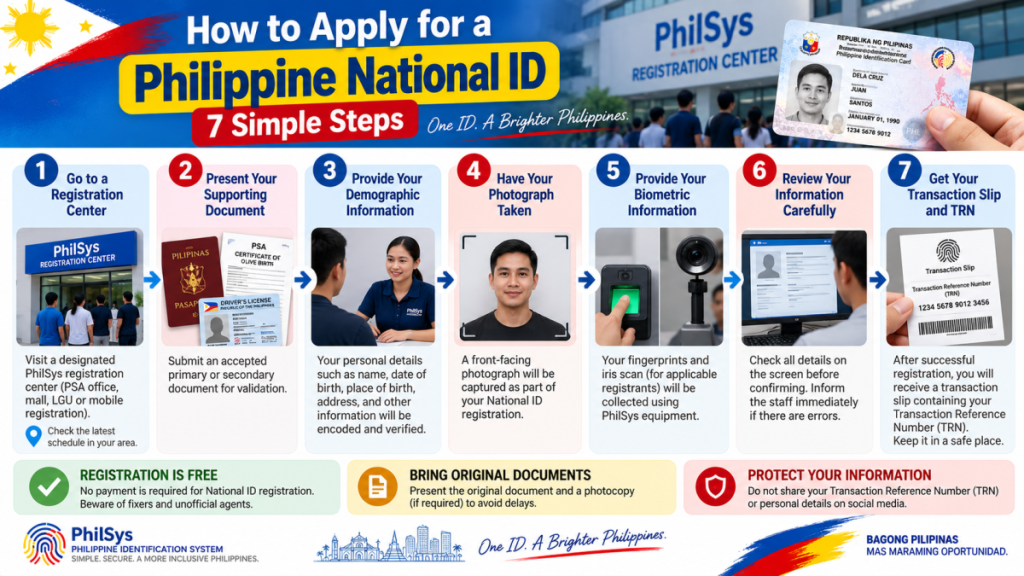
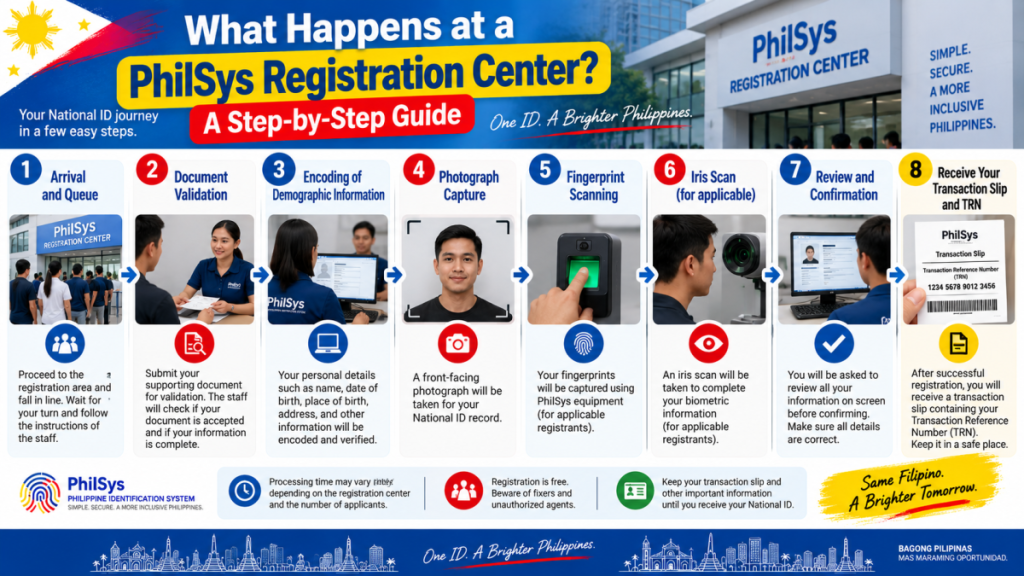
Once you have an acceptable supporting document and have identified an active registration center, the actual process can be broken down into several stages.
1. Go to a designated registration center
Bring your supporting document and, if applicable, the documents required for the person you are accompanying.
At the center, tell the registration personnel that you are registering for PhilSys. Follow the instructions given by the registration staff rather than relying on unofficial advice from other applicants.
Registration procedures can differ slightly depending on the facility, so allow enough time instead of assuming the visit will take only a few minutes.
2. Present your supporting document
Your document will be checked as part of the identity-validation process.
This is where having the correct document matters. If the information on your documents is inconsistent, additional verification may be necessary.
Before your registration date, check simple details such as:
- spelling of your full name
- date of birth
- place of birth
- address
- other identifying information
If something is clearly incorrect on a supporting document, resolve the issue with the appropriate issuing agency when necessary rather than assuming the registration center can simply change the underlying record.
3. Provide your demographic information
Registration personnel will collect and verify the demographic information required by PhilSys.
This can include information such as your name, sex, date and place of birth, address, and other information required for the PhilSys record.
Pay attention during this stage.
A practical tip is to listen carefully when your information is being entered or verified. If something does not look or sound correct, raise it immediately instead of waiting until after registration.
4. Have your photograph taken
A front-facing photograph is captured as part of the registration process.
Make sure you follow the registration personnel’s instructions when the photograph is taken. Avoid anything that could interfere with clear identification unless it is permitted for your circumstances.
The photograph becomes part of your National ID record.
5. Provide your biometric information
Biometric information is collected as part of PhilSys registration.
For applicable registrants, this includes fingerprints and an iris scan in addition to the photograph. These biometric details help establish and authenticate a person’s identity within the system.
The process is handled at the registration center using the equipment provided for PhilSys registration.
6. Review your information carefully
This is one of the most important parts of the process.
Before confirming the information recorded during registration, check it carefully. Look for mistakes in your name, date of birth, address, and other personal details.
It is much better to identify an obvious error during the registration process than to discover it later when using your National ID for another transaction.
If you notice a problem, tell the registration personnel before completing the process.
7. Keep your transaction slip and TRN
After registration, you will receive a transaction slip containing your Transaction Reference Number (TRN).
Do not throw this away.
Take a clear photo or make a secure record of the TRN for your own reference, while avoiding posting it publicly online. You may need the information when checking the status of your National ID or when dealing with certain follow-up services.
Your TRN is different from your permanent National ID Number. Do not confuse the two.
What Should You Do After Registration?
Finishing registration does not necessarily mean you immediately walk out with a physical National ID card.
The physical National ID is produced and delivered through the government’s process. While waiting, there are other National ID formats and services that may be available to registered individuals.
Digital National ID
The Digital National ID is particularly useful for people who have already registered but are still waiting for their physical card.
PSA states that registered individuals are eligible for the Digital National ID. It can be accessed through official National ID services, including the eGovPH application.
The Digital National ID is not simply a photograph of your physical card. It forms part of the government’s digital identity system and includes mechanisms for identity verification.
When using it for a transaction, follow the organization’s verification instructions. Acceptance should be based on the official National ID authentication process rather than on whether an employee personally recognizes a screenshot or image.
PSA has also issued guidance stating that the Digital National ID is a valid and sufficient proof of identity and age, subject to the applicable authentication process.
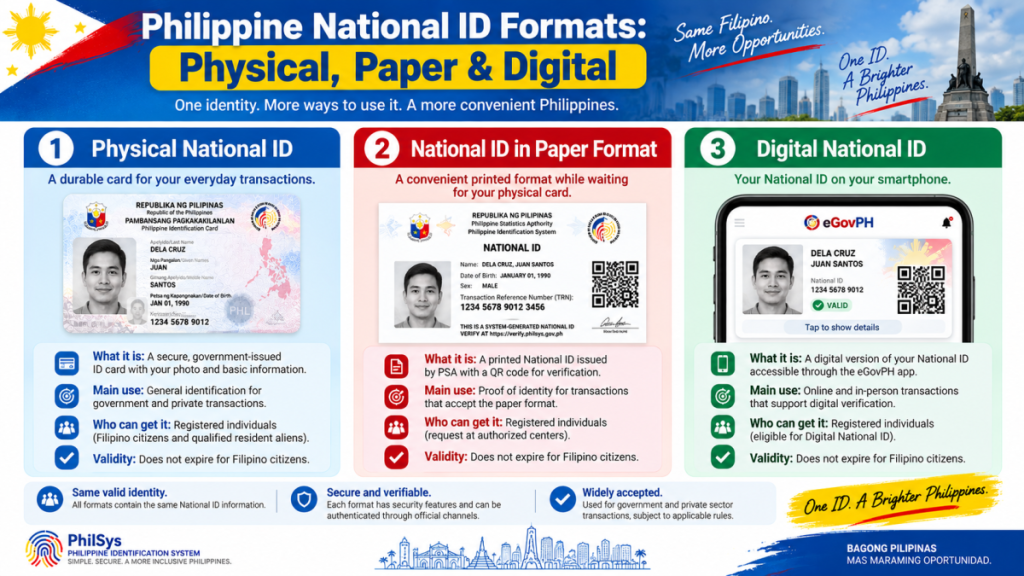
Can You Get a Paper National ID?
Yes. The National ID is available in multiple formats, including the physical card, the paper format, and the Digital National ID.
The paper format can be particularly useful for registered individuals who need a National ID credential while waiting for the physical card.
Availability of services can vary by location, so check with an authorized registration center or the official PhilSys channels for the current procedure.
How Do You Track Your National ID?
If your physical National ID has already been processed for delivery, your Transaction Reference Number can be used for tracking through the delivery-tracking service referenced by PhilSys.
Keep your transaction slip until you have successfully received your National ID or no longer need the information for follow-up.
If you lost your transaction slip, do not immediately register again. Contact the appropriate official PhilSys or PSA channel and ask what recovery or verification options are currently available.
What If Your National ID Information Is Wrong?
Do not create a second registration just because you discovered an error.
PhilSys provides an updating process for registered individuals whose personal information needs to be changed or corrected.
The documents required depend on what information needs to be updated. For example, a correction involving a civil-status record or date of birth may require supporting documentation from the appropriate government authority.
Before visiting an updating center, check the current PhilSys instructions for the specific correction you need.
What If You Have Not Received Your Physical National ID?
Not receiving the physical card immediately does not necessarily mean your registration failed.
First, check your registration or delivery status using the available official tracking channels. Your TRN can be important for this purpose.
You can also check whether your Digital National ID is already available. If it is, you may be able to use it for transactions that accept the Digital National ID and its authentication process.
If you believe there is a problem with your registration, contact PSA or PhilSys through official channels rather than paying an individual who claims they can “speed up” your National ID.
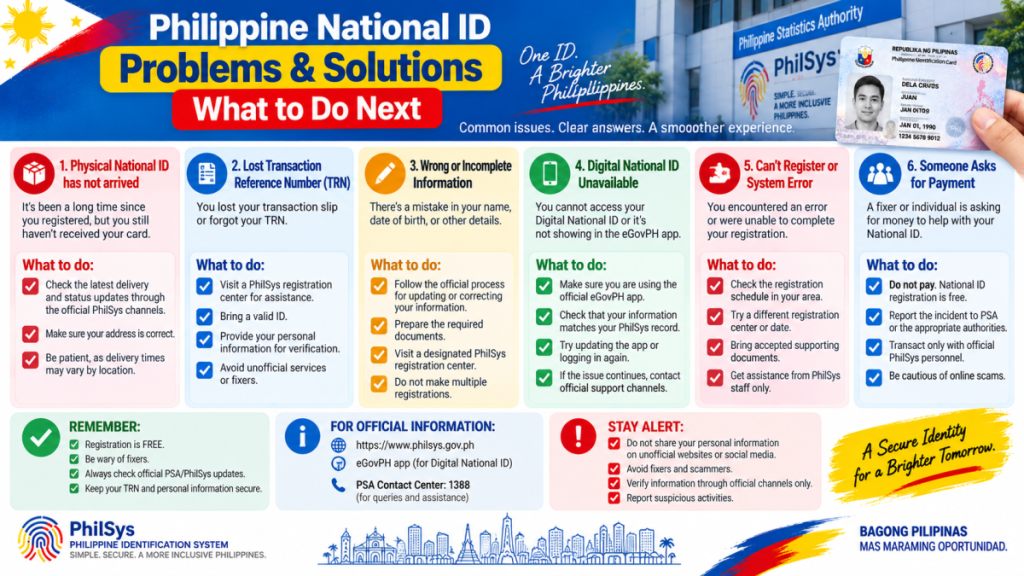
Common Mistakes to Avoid
The registration process itself is relatively straightforward, but several mistakes can cause unnecessary problems.
Using an outdated requirements list.
National ID information published several years ago may not reflect the current list of acceptable documents or registration locations.
Going to a registration center without checking first.
Operating schedules and registration arrangements can change. Verify the location before traveling.
Throwing away your transaction slip.
The TRN can be useful for tracking and follow-up.
Registering again because your card has not arrived.
If you already completed registration, a second registration is generally not the solution.
Posting your National ID information online.
Avoid sharing your National ID details, transaction information, or other personal identity information publicly.
Paying a fixer.
PhilSys registration is a government service. Be cautious if someone claims they can guarantee faster registration or delivery in exchange for money.
Using unofficial websites for sensitive information.
For National ID concerns, start with official PSA and PhilSys resources.
National ID Safety: Protect Your Personal Information
The National ID contains information that can be used to establish your identity, so treat it like any other important identification document.
Do not casually send photographs of your ID to strangers. If a bank, company, government office, or other organization legitimately requires identification, make sure you understand why the document is needed and that you are dealing with the correct organization.
Be especially careful with messages claiming that your National ID needs to be “activated,” “verified,” or “renewed” through an unfamiliar link.
PSA has warned the public about individuals impersonating PSA personnel. When in doubt, independently visit the official PSA or PhilSys website rather than clicking a suspicious message.
Why the National ID Is Becoming More Useful
The National ID was designed to simplify identity verification across government and private-sector services.
Its practical use has expanded beyond simply having another identification card. PhilSys identifies applications involving government services, social protection programs, health services, tax-related transactions, passport and driver’s license applications, and financial services.
The system is also increasingly being used for digital authentication.
In 2026, PSA announced integrations involving financial services, including remittances, bills payment, digital banking, and social protection benefits. PSA also announced an integration with BPI that allows eligible customers to use National ID authentication as part of digital account-opening processes.
These developments show why keeping your National ID record accurate and protecting your identity information matters.
Your 2026 National ID Registration Checklist
Before leaving home:
☐ Confirm that you are eligible to register
☐ Check the current PhilSys supporting-document list
☐ Prepare the appropriate original supporting document
☐ Verify your name and birth information
☐ Check the registration center and operating schedule
☐ Bring any required documents for a child or dependent
☐ Review your information carefully during registration
☐ Keep your transaction slip and TRN
☐ Avoid posting your registration information publicly
☐ Use only official PSA/PhilSys channels for follow-up
Following this checklist can prevent many of the simple problems that make government transactions more time-consuming.
Frequently Asked Questions
Is Philippine National ID registration free?
Yes. The National ID registration service itself is free. Be cautious about anyone asking you to pay an unofficial registration or “processing” fee.
Can I register for a National ID online?
PhilSys registration involves an in-person process for identity and biometric capture. Official online services may provide other National ID functions, but they do not replace the required registration process.
Can I use my Digital National ID instead of the physical card?
Yes. PSA recognizes the Digital National ID as a valid proof of identity and age, subject to the applicable authentication process.
What if I lost my transaction slip?
Do not register again. Contact an official PSA or PhilSys channel and ask about the current procedure for recovering or verifying your registration information.
Can children get a National ID?
Yes. Filipino children can register from age 1. The biometric process differs for young children, and a parent or legal guardian is involved in the registration process.
Does the National ID expire?
The National ID itself does not have an expiration date for Filipino citizens. Certain information may still need to be updated when a person’s circumstances change.
Can I use the National ID at a bank?
The National ID can be used as proof of identity for qualifying financial transactions, subject to the bank’s applicable verification procedures and regulations.
Do I still need other IDs after getting a National ID?
Yes. The National ID does not automatically replace specialized government IDs, licenses, or credentials that serve a particular purpose.
Final Advice for Applicants
If you are applying for your Philippine National ID in 2026, the best preparation is not complicated: bring an acceptable document, verify the registration location before you go, carefully review your information, and keep your transaction reference details safe.
If your physical card has not arrived, do not assume that your registration failed. Check the available official tracking options and see whether your Digital National ID is already accessible.
Most importantly, use current information from the PSA and PhilSys rather than relying on old articles, social-media posts, or unofficial agents. Registration centers, supporting-document requirements, and National ID services can change as the system develops.
The National ID is increasingly becoming part of everyday identity verification in the Philippines. Taking a few extra minutes to prepare your documents and protect your personal information can make the process considerably easier.
Sources and verification
This guide was researched using official Philippine government and PhilSys materials, including the Philippine Statistics Authority, PhilSys registration instructions, supporting-document requirements, National ID FAQs, and recent PSA announcements. Readers should verify current registration-center availability and requirements through official channels before visiting.





 Facebook
 Twitter