
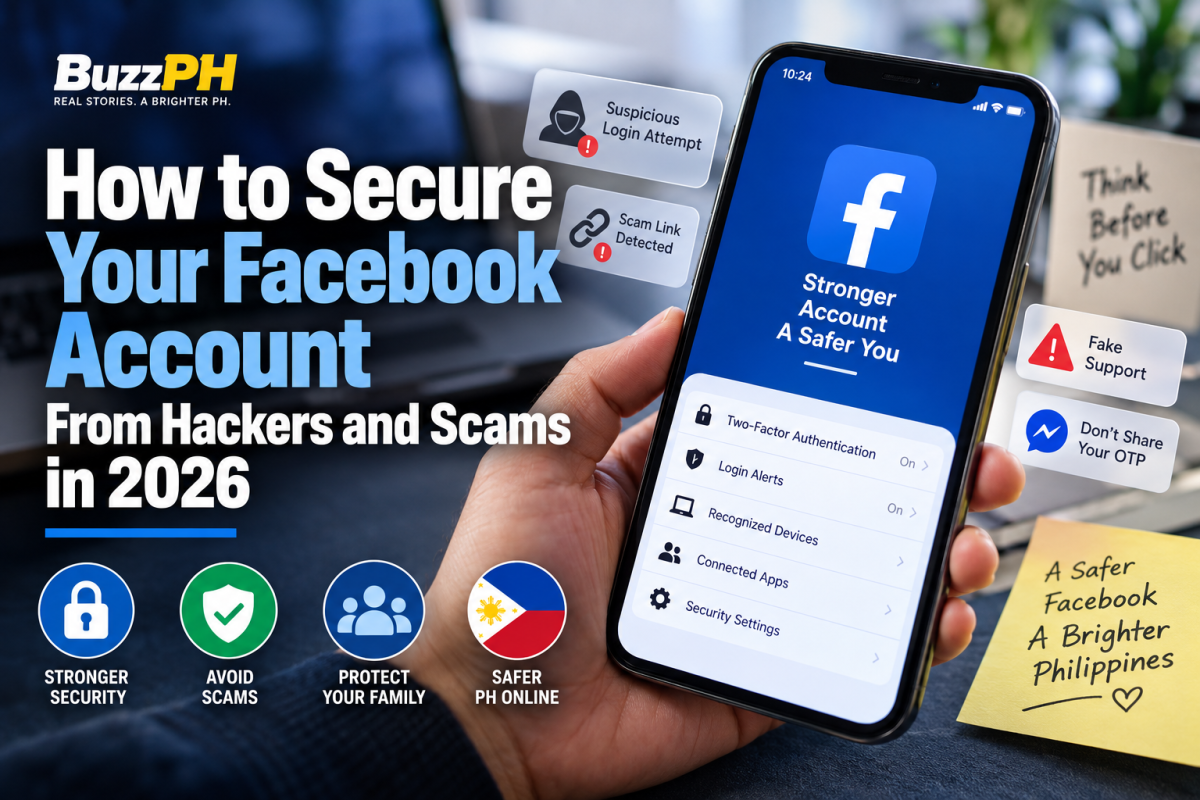
Facebook is an important part of everyday online life for many Filipinos. People use it to communicate through Messenger, buy and sell products, manage Facebook Pages, participate in community groups, promote businesses, and stay connected with friends and relatives.
That also makes Facebook accounts attractive targets for scammers and cybercriminals.
A compromised account can be used to impersonate you, send fraudulent messages to your contacts, distribute malicious links, interfere with a business Page, or attempt to access other accounts connected to your Facebook profile.
Fortunately, you do not need advanced cybersecurity knowledge to make your account considerably safer.
This guide explains practical ways to secure your Facebook account in 2026, recognize common scams, protect your recovery options, and respond if you believe someone has gained unauthorized access.
Important: Facebook’s interface and available security features can change. Menu names may also vary depending on your device, account, and region. When in doubt, use Facebook’s current security settings and official Help Center rather than relying on an old tutorial or screenshot.
Why Facebook accounts are targeted by hackers and scammers
Not every Facebook account takeover begins with an attacker directly defeating Facebook’s security systems.
In many cases, criminals first attempt to obtain the information needed to access an account. They may use phishing pages, fake security warnings, social engineering, malicious software, stolen passwords, or impersonation.
Common approaches include:
- Fake Facebook or Meta security warnings
- Messages claiming an account will be suspended
- Fake copyright or policy violation notices
- Fraudulent prize or promotion messages
- Fake job offers
- Marketplace scams
- Messages pretending to come from friends or relatives
- Links asking users to “verify” their accounts
- Passwords reused across multiple websites
- Malicious applications or websites
This is why Facebook security should not be treated as a password-only issue.
The Cybercrime Investigation and Coordinating Center (CICC) advises Filipinos to be cautious about suspicious messages, online money requests, unsolicited offers, and attempts to obtain sensitive information such as one-time passwords. CICC Kontra Scam guidance
The practical lesson is simple: protect both your account and your behavior.
Use a strong and unique Facebook password
Your Facebook password should be difficult to guess and, most importantly, different from passwords you use on other websites.
Password reuse creates a chain reaction.
For example, suppose you use the same password for Facebook and an unrelated website. If that other website suffers a data breach and your credentials are exposed, criminals may attempt to use those credentials on Facebook.
Using a unique password limits this type of credential-stuffing attack.
Avoid passwords based on information that someone could easily discover from your profile, such as:
- Your name
- Birthday
- Mobile number
- Partner’s name
- Children’s names
- Business name
- Favorite sports team
- Common words followed by “123”
- Simple variations of an old password
Length is also important. A longer passphrase made from several unrelated words can be easier to remember and harder to guess than a short password with a few symbols added.
If you have difficulty remembering unique passwords, a reputable password manager can generate and store them.
If your Facebook password has been reused on other websites, changing it to a unique password should be one of your first security improvements.
Turn on two-factor authentication
Two-factor authentication, commonly called 2FA, adds another layer of protection beyond your password.
Meta’s Facebook Help Center documents several two-factor authentication options, including authentication apps, SMS, and security keys, although the available options can depend on the account and circumstances. Meta’s Facebook 2FA guidance
The basic principle is straightforward: a password alone should not necessarily be enough to complete an account login.
When available, an authenticator app or security key can provide an authentication method that does not depend solely on receiving an SMS message. However, choose a method you can securely maintain and recover.
Don’t enable 2FA and then forget about account recovery.
If your phone is lost, replaced, damaged, or unavailable, you should understand what backup options you have.
Meta also documents recovery codes that can be used when you cannot access your normal two-factor authentication method. Meta’s recovery-code guidance
Review where your Facebook account is logged in
Another useful security habit is reviewing the devices and sessions associated with your Facebook account.
This is particularly important if you:
- Lost a phone
- Sold an old device
- Used Facebook on a public computer
- Logged into Facebook on somebody else’s device
- Replaced an old phone
- Received an unexpected login notification
Look for devices or sessions you do not recognize.
However, don’t assume that an unfamiliar location automatically means someone hacked your account. Location information can sometimes be approximate because of mobile networks, internet service providers, VPNs, or other technical factors.
Consider the entire situation.
An unfamiliar device combined with an unfamiliar login time or other suspicious activity deserves investigation.
If you identify a session that clearly does not belong to you, log it out and change your password.
Turn on security and login alerts
Security alerts can help you notice suspicious activity sooner.
Facebook provides security features designed to help users identify unusual account activity, including login-related alerts. Facebook Help Center
Pay attention to notifications involving:
- New device logins
- Password changes
- Security-setting changes
- Recovery information changes
- Other unexpected account activity
At the same time, be careful when responding to security notifications received through email or Messenger.
Scammers can imitate legitimate Facebook security messages.
If you receive an unexpected warning, don’t automatically click the link in the message.
Instead, open Facebook directly through the official application or website and check your account security settings yourself.
Secure the email account connected to Facebook
Your Facebook account is only as secure as the recovery channels associated with it.
Your email account can be particularly important because it may receive password-reset messages and other security communications.
If someone gains control of your email account, they may attempt to interfere with the recovery of your Facebook account.
Protect your primary email account with:
- A unique password
- Two-factor authentication
- Updated recovery information
- Login and security alerts where available
Never use your Facebook password for your email account.
You should also periodically check the email addresses and phone numbers associated with Facebook.
Meta provides account tools for managing contact information through its Accounts Center. Meta Help Center — Contact information
Remove old contact information that you no longer control, but make sure you maintain a legitimate recovery method before removing anything important.
Protect the phone and mobile number connected to Facebook
Your phone may play a role in authentication or account recovery, so securing the device itself is important.
Use a strong device passcode or biometric lock and keep your operating system and applications updated.
Avoid installing unofficial or modified versions of Facebook because a website claims they provide additional features, free tools, or better security.
Android users should be particularly cautious when an unfamiliar website asks them to install an APK before they can supposedly view a Facebook video, claim a reward, or resolve an account problem.
CICC’s cybersecurity materials also encourage users to practice basic digital security, including caution with suspicious communications and keeping software updated. CICC cybersecurity guidance
If you suddenly lose mobile service without an obvious explanation and notice suspicious account activity at the same time, contact your mobile provider and investigate.
Understand how Facebook phishing scams work
Phishing is one of the most important Facebook threats to understand.
A scammer may send a message claiming:
“Your account will be permanently disabled.”
Another may say:
“Your Page violated copyright rules.”
A different message may promise a reward if you “verify” your account.
The common element is pressure.
The message is designed to make you act before you have time to think.
A link can lead to a fake Facebook login page. It may look convincing enough that you enter your email address and password without realizing that you are not actually on Facebook.
A useful rule is:
Never use an unexpected security link to solve a supposed security problem.
If you receive a suspicious Facebook warning, open Facebook independently through the official app or website.
CICC’s anti-scam materials similarly advise users to be cautious about suspicious communications, links, and offers. CICC Kontra Scam guidance
How to recognize a suspicious Facebook message
A message deserves extra scrutiny when several warning signs appear together.
Look for:
- A demand that you act immediately
- Threats that your account will be deleted
- A request to enter your password
- A request for an OTP
- An unfamiliar or misleading web address
- An unexpected attachment or download
- An offer that seems unusually good
- A request for money
- A message that sounds unlike the person normally contacting you
One warning sign does not necessarily prove that something is fraudulent.
The important question is whether the request can be independently verified.
If you are unsure, stop the conversation and investigate through an official channel.
Be careful when a friend suddenly asks for money
A Facebook scam becomes more convincing when an attacker controls the account of someone you know.
Imagine receiving a Messenger message from a relative:
“Can you send me ₱2,000? I’m having an emergency.”
The profile picture may be genuine.
The name may be correct.
The conversation may even look normal.
That still doesn’t prove the request is legitimate.
If someone unexpectedly asks for money, an OTP, personal information, or an unusual favor, verify the request through another communication channel.
Call the person.
Send an SMS to their known number.
Speak to them directly.
CICC’s anti-scam guidance recommends independently verifying unusual money requests rather than relying solely on an online message. CICC Kontra Scam guidance
This simple habit can prevent a compromised Facebook account from becoming a financial loss for your friends or family.
Be cautious with Facebook Marketplace transactions
Facebook Marketplace is useful for buying and selling products, but transactions with strangers can also create opportunities for fraud.
Warning signs include:
- Prices that appear unrealistically low
- Pressure to pay immediately
- Requests to move the conversation outside Facebook
- Fake payment confirmations
- Requests for OTPs
- Fake courier or delivery links
- Requests for unnecessary personal information
- Screenshots presented as proof of payment
Never treat a screenshot as definitive proof that money has reached your account.
Check your actual bank or e-wallet application.
If a buyer claims that payment has been made, verify the transaction independently rather than relying on an image sent through Messenger.
A buyer or seller should not need your Facebook password or authentication code to complete an ordinary Marketplace transaction.
Never share your Facebook password or OTP
Treat your Facebook password and authentication codes as private credentials.
If someone says:
“Send me the code you just received so I can verify your account.”
Stop.
Do not send it.
An authentication code may be the additional credential needed to complete a login or security action.
The same principle applies to codes associated with email accounts, banks, e-wallets, and other important services.
CICC’s official anti-scam guidance warns users not to provide OTPs and other sensitive authentication information to scammers. CICC Kontra Scam guidance
Review apps and websites connected to Facebook
Over the years, you may have used Facebook to sign in to games, websites, applications, or other online services.
Some of those connections may no longer be necessary.
Review applications and services associated with your Meta account and remove access you no longer recognize or use.
Don’t remove a connection blindly if you still rely on that service.
Instead, determine what the connection does first.
The goal is to reduce unnecessary access and make it easier to identify anything suspicious.
Keep Facebook and your devices updated
Security updates can fix vulnerabilities and improve software protection.
Keep your:
- Facebook application
- Phone operating system
- Web browser
- Password manager
- Security software
updated through legitimate sources.
Don’t download unofficial Facebook applications because a website claims they offer special security features.
Likewise, don’t install software simply because a Messenger message tells you that you need it to “verify” your Facebook account.
Watch out for fake Facebook support accounts
Scammers may pretend to be:
- Facebook support
- Meta support
- Account-recovery specialists
- “Facebook agents”
- Page verification experts
They may promise to recover your account for a fee.
They may request your password.
They may ask for an OTP.
They may ask you to install remote-access software.
Be extremely cautious.
Don’t give strangers control of your device or account simply because their profile uses Facebook or Meta branding.
For account problems, start with Facebook’s official Help Center and recovery tools. Facebook Help Center
What to do if your Facebook account has been hacked
If you believe someone has gained unauthorized access, act quickly.
If you still have access to the account:
- Change your Facebook password.
- Review logged-in devices and sessions.
- Log out unfamiliar devices.
- Check your email and phone information.
- Review your security settings.
- Enable or strengthen 2FA.
- Check your recovery options.
- Remove suspicious connected applications.
- Review recent posts and Messenger activity.
- Warn friends if suspicious messages were sent from your account.
- Secure your email account if you believe it may also have been compromised.
If you cannot access your account, use Meta’s official hacked-account recovery process:
facebook.com/hacked
Meta’s Help Center directs users who believe their account has been hacked to its account-recovery process and recommends using a device that has previously been used to log into Facebook. Meta — Hacked Account Recovery
Avoid paying an unknown person who claims they can guarantee recovery.
A person contacting you through Messenger and asking for your password or OTP is not made legitimate simply because they claim to be a Facebook “agent.”
What to check after recovering a hacked account
Recovering access is not the end of the process.
After regaining control, review the account carefully.
Check for:
- Changed email addresses
- Changed phone numbers
- Unknown login sessions
- Unexpected posts
- Suspicious Messenger conversations
- Unknown connected applications
- Changed security settings
- Unfamiliar Pages or business permissions
If the attacker sent scam messages to your contacts, consider warning those people.
A simple message such as:
“My Facebook account was compromised earlier. If you received a strange message or payment request from me, please ignore it.”
can prevent friends and family from becoming victims.
Secure your Facebook Page if you operate a business
For Filipino entrepreneurs, Facebook security can directly affect business operations.
If your personal Facebook account manages a Page, advertising assets, groups, or other business resources, losing control of your personal account can create additional problems.
Don’t share your personal Facebook password with employees.
Instead, use Meta’s available business-management and permission features so each person receives only the access required for their role.
When someone leaves your business, review their permissions and remove access that is no longer necessary.
This follows an important cybersecurity principle:
Give people only the access they need.
Create a recovery plan before you need it
One of the most overlooked parts of account security is recovery.
Security features are useful only if you can regain access when something goes wrong.
Review the recovery information associated with Facebook and your email account.
Meta also provides Facebook login recovery codes that can serve as a backup when your normal authentication method is unavailable. Meta’s 2FA and recovery-code guidance
Store recovery information securely.
Don’t post recovery codes in Messenger or share them with another person.
Your recovery methods should be protected almost as carefully as your password.
Our practical Facebook security framework
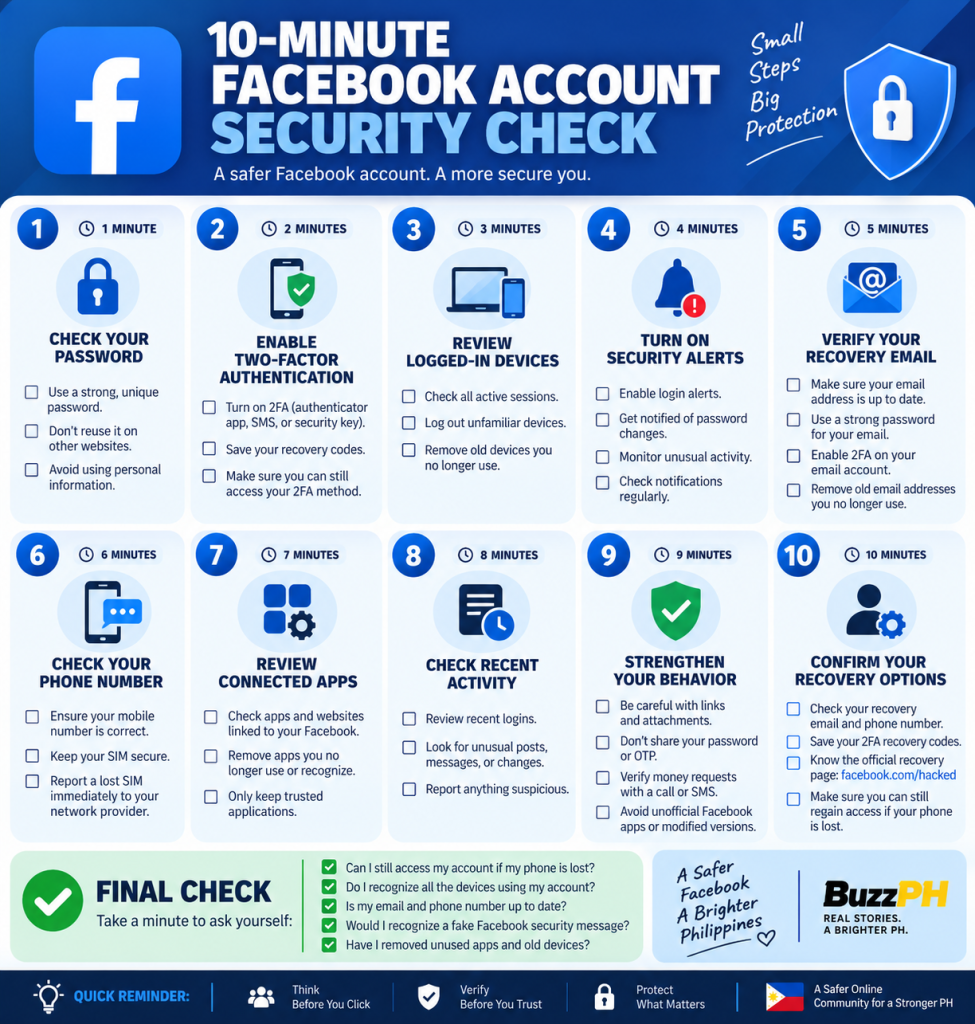
Instead of checking account security only after something goes wrong, it is useful to think about Facebook security as five areas:
Access: Is your password unique and is 2FA enabled?
Devices: Do you recognize the devices currently accessing your account?
Recovery: Can you still access your recovery email, phone number, and backup authentication methods?
Permissions: Are there applications or services connected to Facebook that you no longer use?
Behavior: Can you recognize phishing, impersonation, fake support messages, and suspicious payment requests?
This five-part framework is an editorial organization developed for this guide, not an official Meta security score or certification.
Its purpose is to turn several individual recommendations into a practical security routine.
How we researched this guide
Buzz PH uses a source-first approach for cybersecurity-related articles.
For Facebook-specific information, this guide prioritizes Meta’s official Help Center and account-recovery documentation. For Philippine-specific scam prevention, it uses materials published by the Cybercrime Investigation and Coordinating Center (CICC).
Where the platform’s features can vary, the article avoids presenting a particular menu location as permanent.
The recommendations in this article fall into three categories:
Official platform guidance: Information about Facebook and Meta security tools documented by Meta.
Philippine cybersecurity guidance: Scam-prevention and cybersecurity recommendations published by Philippine government authorities.
Buzz PH editorial guidance: Practical organization and examples intended to help Filipino readers apply the information.
This distinction is important because a website should not present its own recommendation as if it were an official Facebook requirement.
Facebook’s interface can change, so readers should verify the current options shown in their own Facebook app or Meta Accounts Center.
Protect your family from Facebook scams
Account security is not limited to your own profile.
If your account is compromised, criminals may use your identity to target people who trust you.
That could include parents, siblings, friends, coworkers, customers, or members of a community group.
Talk to family members about simple rules:
- Never give an OTP to someone through Messenger.
- Verify unusual money requests by calling.
- Don’t click unexpected account-security links.
- Don’t install unknown applications.
- Never share your Facebook password.
- Be suspicious of unusually urgent requests.
This is especially useful when helping relatives who are less familiar with phishing and online impersonation.
Facebook security checklist
Use this checklist when reviewing your account:
☐ My Facebook password is unique.
☐ I don’t reuse it on other websites.
☐ Two-factor authentication is enabled.
☐ I know which devices are logged into Facebook.
☐ My email account is also protected.
☐ My recovery email and phone number are current.
☐ I don’t give authentication codes to other people.
☐ I don’t click unexpected Facebook security links.
☐ I verify unusual money requests independently.
☐ I review connected applications periodically.
☐ My phone and Facebook application are updated.
☐ I know where to find Facebook’s official recovery process.
Frequently asked questions about Facebook security
Is two-factor authentication enough to prevent Facebook hacking?
No.
Two-factor authentication is an important additional security layer, but it does not eliminate every threat.
Users can still be targeted through phishing, social engineering, malware, compromised email accounts, or other attacks.
For that reason, 2FA should be combined with a unique password, secure recovery channels, updated devices, and careful handling of suspicious messages.
Which Facebook 2FA method should I use?
The best option depends on what Meta offers for your account and what you can securely maintain.
Meta documents multiple two-factor authentication methods, including authentication apps, SMS, and security keys. Meta’s Facebook 2FA guidance
An authenticator app or security key can provide an alternative to relying exclusively on SMS, but the right choice depends on your circumstances and ability to maintain access.
Can someone hack my Facebook account just by knowing my phone number?
Knowing your phone number alone does not automatically give someone access to your Facebook account.
However, personal information can be useful in social-engineering attacks.
Never provide passwords, OTPs, or recovery information simply because someone knows your name or phone number.
Should I give my Facebook OTP to a friend?
No.
Treat authentication codes as private.
If someone asks you to send a code you just received, stop and verify what is happening before doing anything else.
What should I do if a friend sends me a suspicious Facebook link?
Don’t click it immediately.
The friend’s account may have been compromised.
Contact the person using another method, such as a phone call or known mobile number, and ask whether they actually sent the message.
What should I do if my Facebook account is already hacked?
If you still have access, immediately change your password, review active sessions, check recovery information, enable 2FA, and investigate suspicious account activity.
If you cannot access the account, use Meta’s official recovery process at facebook.com/hacked. Meta recommends using a device that you previously used to log into Facebook. Meta — Hacked Account Recovery
How often should I check my Facebook security settings?
There is no universal schedule required for every Facebook user.
A practical approach is to review your security settings periodically and whenever something changes—for example, after getting a new phone, losing a device, receiving an unexpected login alert, or noticing suspicious activity.
Can a Facebook account be made completely hack-proof?
No.
No security measure can guarantee that an account will never be compromised.
The realistic goal is to reduce the likelihood of unauthorized access and limit the potential damage if an attack occurs.
A unique password, 2FA, secure recovery methods, updated software, and good phishing awareness provide multiple layers of protection.
Final thoughts: secure your Facebook account before something goes wrong
Facebook security is not a one-time task.
It is a combination of account settings, recovery planning, device security, and everyday habits.
Start with the basics: use a unique password, enable two-factor authentication, secure your email account, review logged-in devices, maintain recovery options, and remove unnecessary connected applications.
Then address the human side of security.
Be skeptical of unexpected links.
Don’t allow urgency to make decisions for you.
Verify unusual requests for money.
Never give your password or OTP to someone claiming to be Facebook support.
For Filipino users, these habits can be particularly valuable because Facebook is closely connected to communication, online selling, community groups, and small-business activity.
The most important rule is simple:
When a Facebook message makes you panic, slow down.
Scammers benefit when you react immediately.
A few seconds spent checking the source, opening Facebook independently, or calling the person who supposedly sent the message can prevent a much larger problem.
If your account is already compromised, don’t rely on strangers promising guaranteed recovery. Use Meta’s official recovery process and start with the devices and recovery information you still control.
Sources and editorial methodology
Meta / Facebook Help Center — Used for Facebook account security, two-factor authentication, recovery codes, contact information, account recovery, and hacked-account guidance. Facebook Help Center
Cybercrime Investigation and Coordinating Center (CICC) — Used for Philippine-specific scam-prevention guidance, including warnings about OTPs, suspicious links, online money requests, impersonation, and other common scams. CICC Official Website
Editorial methodology: Buzz PH prioritizes primary sources for platform-specific claims and Philippine government sources for local cybersecurity guidance. Editorial recommendations are identified as such rather than being presented as official Facebook requirements.
Last reviewed: September 2026





 Facebook
 Twitter